4.08
Browser clients stop lagging
Players joining through Safari could find the game close to unplayable — a quick tap on FLAP would stick, carry on holding by itself and join a game you were not trying to join, and in play you might manage one flap every couple of seconds. Two phones sitting side by side on the same WiFi, connected to the same host, could behave completely differently.
It was not a slow network. Taps were being thrown away before they reached the game. That is fixed, and a browser client is now as responsive as an app client.
Find your own bird
With a big group on screen, the hardest question is which bird is yours. Holding a button now draws a black-and-white circle around your bird and around your score, for exactly as long as you hold it:
- iPhone and iPad app clients: shake the device.
- Mac app clients: press S or down-arrow.
- Game controllers: press down on the pad.
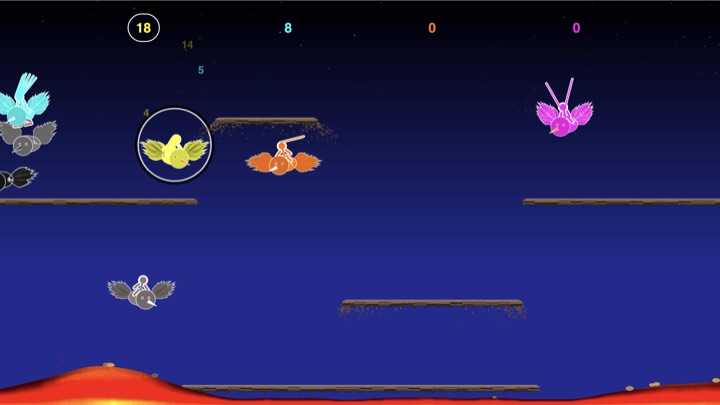
The circle follows you rather than any particular bird. Waiting to drop back in, it rings your arrow. Knocked off your mount, it rings your rider on foot rather than the riderless bird you just lost. Rescued and riding as a passenger on somebody else's bird, it rings you and not the bird, so a crowded mount still tells everybody which passenger is which.
This replaces the old behaviour, which briefly turned your player white. That was easy to miss if you blinked, and completely useless to whoever was flying the white bird.
Level select stops at 1
Up and down on the Siri Remote move the lobby's level by ten at a time. Going up has always stopped at the highest level you can play; going down did not stop at all, and below level 1 is the information panel — so from anywhere in the first ten levels a single tap fell out of level selection and landed you on an info page, usually the networking one. Down now stops at level 1, the same way up stops at the top. The information pages are still one step down from level 1 when you actually want them.